Aesthetic Girls Saree Portrait AI Photo Editing Prompts
Saree portraits are one of the most elegant and timeless styles of photography in the world. When you combine that traditional beauty with cinematic AI photo editing, the result is absolutely breathtaking. Right now, girls across Instagram and Pinterest are going viral with aesthetic saree portraits rich fabric textures, soft golden lighting, dreamy bokeh backgrounds, and that perfect filmy, cinematic vibe.
The best part? You do not need a photographer, a studio, or an actual saree. With the right AI photo editing prompts, we can help you turn any ordinary photo into a stunning cinematic saree portrait in under two minutes. Let us show you exactly how.
What Makes a Saree Portrait Cinematic?
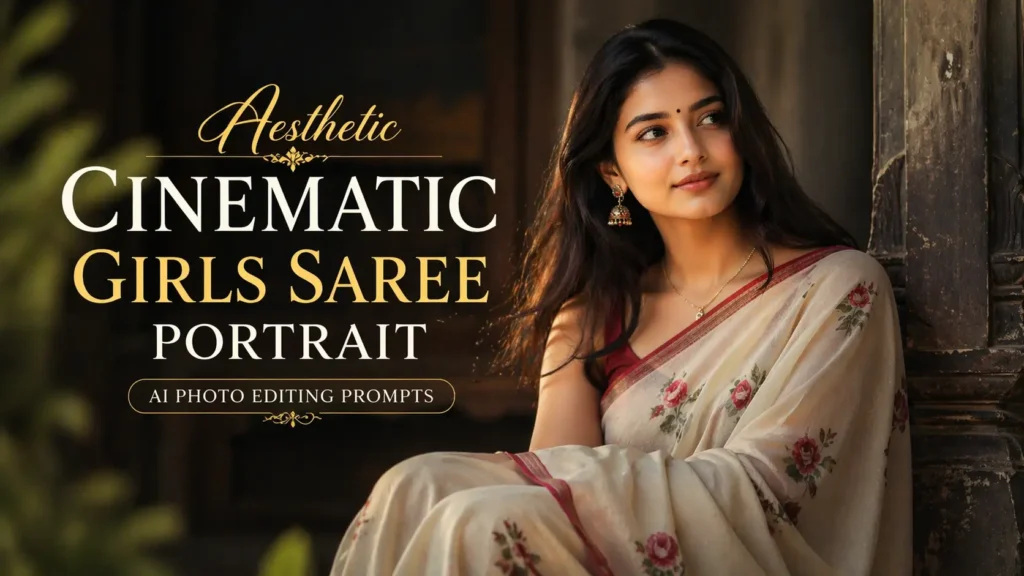
A cinematic saree portrait is not just a photo of a girl in a saree. It is a carefully composed image that feels like a still frame pulled directly from a Bollywood film or a high-end fashion editorial. Every element the lighting, the drape, the background, the skin tone, the color grading works together to create an image that stops people mid-scroll.
AI photo editing tools like Google Gemini, ChatGPT, and Midjourney can now recreate this cinematic saree aesthetic from a single selfie. All they need from you is a detailed, well-written prompt that describes exactly what you want. That is the skill we are going to teach you today.
Why Saree AI Portraits Are Dominating Social Media
Saree content has always performed well online because it blends cultural beauty with visual elegance. But since AI tools started making cinematic saree portraits accessible to everyone, the trend has absolutely exploded. You will find these images trending on Instagram Reels, Pinterest boards, and WhatsApp status updates across South Asia and beyond.
Here is why you need to try this trend right now:
- No physical saree required AI dresses your photo in any saree style you describe.
- Studio-quality results for free Google Gemini and ChatGPT create professional-grade portraits at zero cost.
- Infinite saree styles from sheer chiffon to rich silk, pastel to vibrant, traditional to fusion, every style is possible.
- Perfect for special occasions create stunning saree portraits for Eid, Diwali, weddings, or birthdays as personal gifts.
- Goes viral effortlessly aesthetic cinematic saree photos consistently attract thousands of likes, saves, and shares.
Elements Every Cinematic Saree Prompt Must Have
Writing a saree AI prompt is an art in itself. A basic prompt gives you a basic result. A layered, detailed prompt gives you a cinematic masterpiece. Every strong saree portrait prompt is built from five core elements that work together. Here is each one broken down clearly.
The Saree — Fabric, Color, and Drape
This is the heart of your prompt. Always describe the saree in full the fabric type, the color, the drape style, and any special details. Try a deep maroon Banarasi silk saree with golden zari border and heavy embroidery, a sheer pastel mint chiffon saree with delicate silver threadwork, or a rich royal blue Kanjeevaram saree with traditional temple border pattern. The more precise your saree description, the more authentic and detailed the AI result will be.
Jewelry and Accessories
Jewelry is what transforms a saree look from simple to stunning. Always include accessory details in your prompt. Describe pieces like a heavy gold choker necklace with kundan stones, delicate jhumka earrings with pearl drops, glass bangles stacked on both wrists, a maang tikka on the hairline, or a nose ring with a thin gold chain. Hair styling adds depth too a low bun decorated with jasmine flowers, loose waves with a braid, or pinned-up curls with gold hair pins.
The Cinematic Setting and Backdrop
The background creates the entire cinematic mood. Strong saree portrait settings include a sunlit haveli courtyard with arched doorways and stone walls, a misty riverside at golden hour with the pallu flowing in the breeze, a rooftop terrace at dusk overlooking city lights, an ancient temple corridor with warm oil lamp glow, a blooming garden of marigolds and roses in soft morning light, or a dimly lit indoor riad with ornate carved wooden doors. Each setting tells a completely different story.
Cinematic Lighting and Color Grade
This is what makes your portrait feel filmy and cinematic rather than just a pretty photo. Use lighting descriptions like warm Bollywood golden hour light with long soft shadows, dramatic side lighting from a window with deep contrast, soft diffused morning light with a hazy dreamy quality, orange and teal cinematic color grade, rich warm tones with slightly desaturated background, or candlelight glow with flickering warm highlights on skin and fabric. These descriptions tell the AI exactly what emotional tone to build.
Pose, Expression, and Camera Framing
Tell the AI how to frame the shot and how the subject should look. Strong pose descriptions include standing gracefully with the pallu draped over one shoulder and floating behind, sitting on old stone steps with hands folded in lap, looking slightly off-camera with a mysterious half-smile, turning away from the camera showing the back drape of the saree, or gazing into a mirror with soft side light. Always add camera style terms like shot on Canon 5D, 85mm portrait lens, shallow depth of field, and cinematic wide-aspect ratio.
Ready-to-Use Cinematic Saree AI Prompts
Each of these prompts is written to work with Google Gemini, ChatGPT with DALL-E 3, and Midjourney. Upload your photo, copy the prompt, and generate. We have built every detail layer in so the AI has everything it needs to create something extraordinary.
Golden Hour Haveli Portrait
Misty Riverside at Dusk
Temple Corridor Candlelight Portrait
How to Use These Prompts on Google Gemini
Google Gemini is currently the best free tool for saree AI portrait editing because it handles face preservation, fabric texture, and skin tones exceptionally well. Here is the exact process to follow.
- Step 1: Take a clear, front-facing selfie in good natural lighting. Make sure your full face is visible and the image is sharp. A well-lit input photo always produces a much better result.
- Step 2: Open Google Gemini on your phone or browser. In the model selector, always choose the Pro model for the highest quality output.
- Step 3: Copy one of the three saree prompts from this article. Do not shorten it. The full detail is what gives you a cinematic result instead of a basic one.
- Step 4: Tap the plus (+) icon inside Gemini, upload your selfie, then paste the full copied prompt into the text box.
- Step 5: Hit Generate and wait a few seconds. Gemini will transform your photo into a fully styled cinematic saree portrait.
- Step 6: If the first result is not perfect, generate again without changing anything. The second or third generation often gives a noticeably sharper and more accurate result.
Top AI Tools for Saree Portrait Editing
We have tested every major AI tool for cinematic saree portrait editing. Here is an honest comparison so you know exactly where to get the best results for your specific need.
- Google Gemini Pro: Best free tool overall. Handles face preservation, saree fabric detail, skin tones, and cinematic lighting exceptionally well. The easiest to use for beginners and gives consistent results.
- ChatGPT with DALL-E 3: Best for following complex, layered prompts word for word. If your saree prompt is very detailed and specific, ChatGPT delivers the most accurate interpretation.
- Midjourney v6: Best for the most visually stunning, magazine-quality saree portraits. Its rendering of silk textures, gold jewelry detail, and cinematic light and shadow is unmatched by any other tool.
- Leonardo AI: Best when you need the same girl in multiple different saree settings. It maintains face and identity consistency across a whole series of generated portraits.
- Adobe Firefly: Best for editing an existing photo. Upload a real portrait and use Generative Fill to add a saree, change the backdrop, or enhance the lighting of an already-captured image.
Pro Tips
These expert-level additions take your saree prompts from good to genuinely breathtaking. We use every one of these in our own editorial saree prompt workflow.
- Always start with Keep the face exactly same as the reference image this single instruction is the most important line in your entire prompt for getting accurate face results.
- Name a specific color grade adding orange and teal cinematic grade, warm Bollywood golden tones, or moody desaturated background with rich foreground colors instantly elevates the filmy feel.
- Describe the pallu movement a floating pallu caught in the breeze, or a pallu draped dramatically over one shoulder and trailing behind adds elegance, movement, and life to any saree portrait.
- Add environmental atmosphere morning mist rising from the ground, dust particles in golden light, soft rain falling behind, or marigold petals scattered around her feet build a deeply immersive scene.
- Use skin and fabric quality terms glowing warm skin, smooth silk sheen, rich fabric texture with visible weave, and soft natural skin tone ensure the AI renders both the person and the saree with maximum realism.
Conclusion
Aesthetic cinematic saree portraits used to require a professional photographer, a full styling team, and hours of post-production editing. AI has changed all of that completely. With the right prompt, you can turn a simple selfie into a stunning editorial saree portrait that looks like it belongs on the cover of a Bollywood magazine for free, in seconds.