Cinematic Flash Filter AI Photo Editing Prompts New 2026
Cinematic photos are everywhere today. From Instagram feeds to brand campaigns, bold and dramatic visuals grab attention fast. People no longer prefer flat or overly polished images. Instead, they want something raw, stylish, and real.
This is where cinematic flash filter AI photo editing comes in. It blends the power of artificial intelligence with the classic look of flash photography. You don’t need advanced editing skills anymore. With the right AI tools and prompts, anyone can create stunning, film-like images in seconds.
Cinematic Flash Filter AI Photo Editing
Cinematic flash filter AI photo editing is a modern editing style that recreates the look of direct flash photography. It uses artificial intelligence to apply effects like harsh lighting, deep shadows, and film grain. The result looks similar to photos taken with a professional camera using on-camera flash.
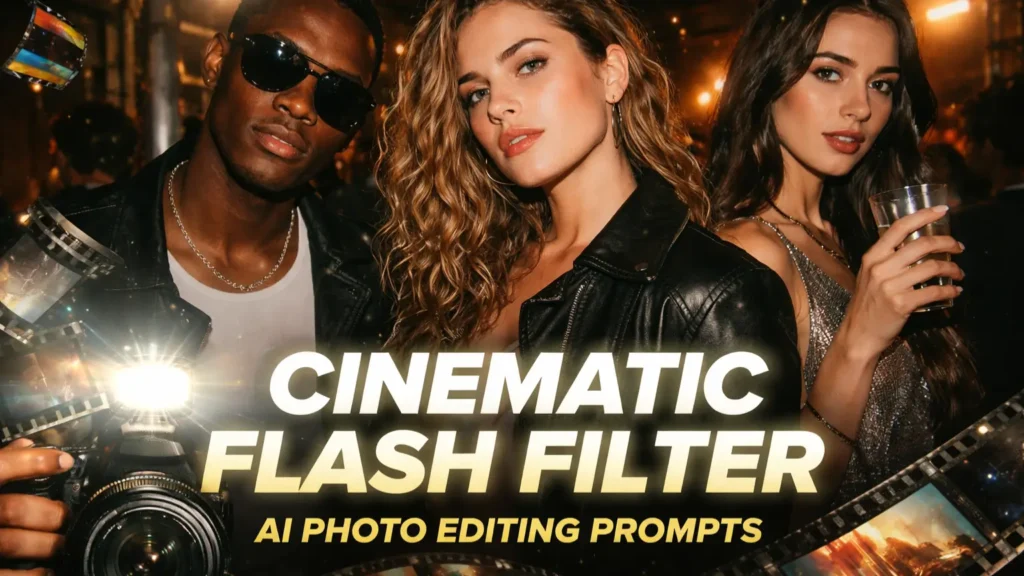
Unlike traditional filters, AI editing works through smart prompts and image processing. You simply describe the look you want, and the AI generates it. This method gives more control and produces realistic results compared to basic presets or overlays. Also try a similar Cinematic Masculine Look AI Photo Prompt.
Why Cinematic Flash Filter is Trending
This editing style is trending because it stands out. Bright flash highlights and strong shadows create a bold visual effect. These images instantly catch the eye while scrolling through social media.
Another reason for its popularity is versatility. It works well across different niches. Whether it’s fashion, street photography, or lifestyle content, the cinematic flash look adds depth and emotion. It also saves time, as AI tools can generate professional-quality edits quickly.
Key Elements of Cinematic Flash Filter Style
Lighting
Lighting is the most important part of this style. The effect is created using direct flash, usually from the camera itself. This produces strong highlights and sharp shadows behind the subject.
The light often feels intense and slightly overexposed. This creates a dramatic and high-impact look. It mimics real flash photography used in nightlife or editorial shoots.
Contrast & Exposure
High contrast is a key feature of cinematic flash images. Blacks appear deeper, and highlights look brighter. This strong contrast helps the subject stand out clearly.
Exposure is slightly pushed to create a glowing effect on the skin or object. However, balance is important. Too much exposure can ruin the details, so AI tools adjust it smartly.
Film Grain & Texture
Film grain adds a realistic touch to the image. It creates a texture similar to 35mm film photography. This removes the overly smooth digital look.
A bit of noise or grain makes the image feel raw and authentic. It also adds a nostalgic vibe, which is popular in modern visual trends.
Color Grading
Color grading gives the final cinematic feel. Some images use teal and orange tones, while others go for muted or faded colors. The choice depends on the mood you want to create.
Desaturated tones often work best for a moody effect. On the other hand, slightly warm tones can make the image feel lively and vibrant.
Mood & Aesthetic
The overall mood is bold and expressive. This style often feels like a mix of fashion photography and candid moments. It captures real emotions with a dramatic touch.
It is commonly linked with nightlife, paparazzi shots, and editorial shoots. The final image feels both raw and cinematic at the same time.
How AI Photo Editing Works for This Effect
AI photo editing uses machine learning models to understand images and apply changes. You provide a prompt or upload a photo, and the AI enhances it based on your input. It adjusts lighting, colors, and textures automatically.
This process is fast and efficient. Instead of manual editing in complex software, AI tools handle everything. They analyze details like depth, shadows, and highlights to produce realistic cinematic results.
Best AI Tools for Cinematic Flash Editing
There are many tools available that support this editing style. Each tool offers different features, but all focus on AI-powered enhancements.
These tools help both beginners and professionals create cinematic images without much effort.
Top Cinematic Flash Filter AI Prompts (Ready to Use)
Night Street Portrait Prompt
Party Flash Aesthetic Prompt
Fashion Editorial Prompt
Paparazzi Style Prompt
Indoor Low-Light Flash Prompt
Step-by-Step Guide to Create Cinematic Flash Photos Using Chatgpt & Gemini
Creating cinematic flash images with AI is simple if you follow a clear process. Most tools work in a similar way, so the steps are easy to understand.
- Choose an AI editing tool
- Upload your photo or start with a prompt
- Enter a cinematic flash style description, copy from Prompt Seen
- Adjust image size for platforms like Instagram
- Generate multiple variations
- Select and download the best result
Trying different prompts will help you get better results over time.
Pro Tips for Better Results
Use Cases of Cinematic Flash Editing
Cinematic flash editing is useful in many creative fields. It adds a unique touch that makes content stand out.
This style works well wherever visual impact is important.
Conclusion
Cinematic flash filter AI photo editing is changing how people create images. It combines modern technology with classic photography styles. The result is bold, dramatic, and highly engaging visuals.
With the help of AI tools and simple prompts, anyone can achieve this look. You don’t need expensive gear or advanced skills. Just experiment, stay creative, and let AI do the work.